TypeLemon helps you type faster while you play. Type the words on the screen to race, shoot zombies or run from a stampede of slimes. It is free, there is nothing to download, and it works on phones, tablets and computers.
How it works
Start typing. Click the typing box on this page (on a phone, tap it) and type the sentence. The timer starts with your first key.
See your speed. When you finish you see your speed in words per minute and your accuracy. Only the letters you typed correctly count.
Play a game or race others. Open Zombie Shooter or Slime Stampede, or press Match to play against other people online.
Why practise typing by playing?
Short, repeated practice works better than one long session, and games make you want to come back. Every game asks you to find the right key quickly, so your fingers learn where the keys are. The My progress page shows whether you are getting faster from week to week.
TypeLemon is a free website where you practise typing by playing games. You type the words you see to play, so having fun also makes you faster. There is nothing to download.
Is it free? Do I need to sign up?
It is free. You can start playing right away as a guest. If you sign in with Google, your progress is saved to your account and follows you to your other phones and computers. As a guest, your progress stays in this browser only, so clearing the browser's data or switching phones starts you over.
Can I play with other people?
Yes. Press Match and the site looks for other players for you. You can also send a friend the link to your room, and other people can join just to watch.
Do I have to wait doing nothing while it finds a match?
No. While the site searches, you keep playing on your own, and a small note tells you it is still searching. When a match is found, the game you are in stops and the shared game starts, so that unfinished game is not kept. If you want to finish it first, cancel the search and press Match again later.
What if nobody else is online?
You can still play. Computer players, marked "CPU", keep you company, so you are never alone in an empty game.
Can I play on my phone?
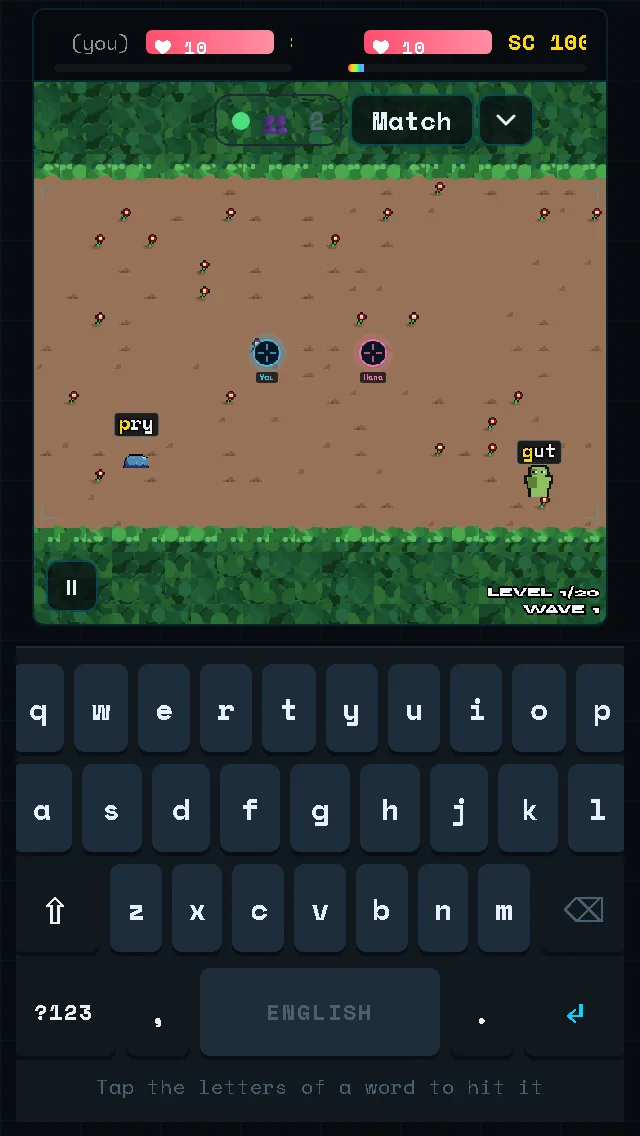
Yes, in portrait and in landscape. TypeLemon shows its own English on-screen keyboard, so your phone's keyboard never covers the game. We check the layout on small and large phone screens, from 320 × 568 up to 430 × 740 pixels.
Portrait on the smallest phone we support (320 × 568): the keyboard sits under the game.
What happens when I turn the phone sideways?
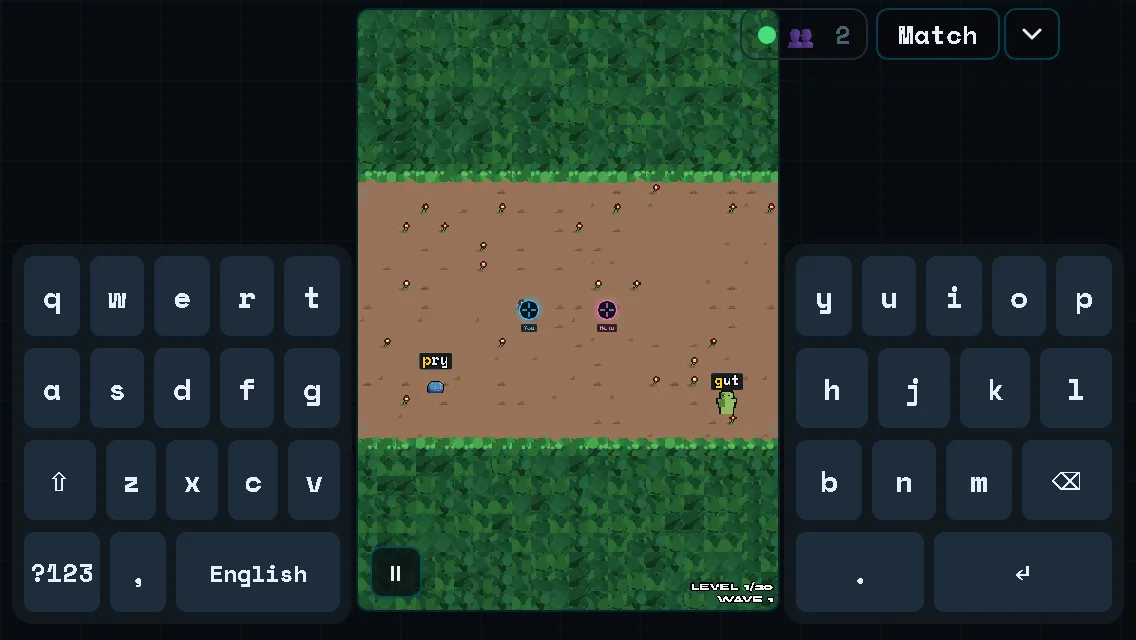
On a short landscape screen the keyboard splits into two halves beside the game, so the game keeps its room. On a tablet it stays at the bottom. Where the screen is big enough, a small Split / Bottom button lets you choose.
Landscape on the same phone (568 × 320): the keyboard splits into two halves beside the game.
Can I use a real keyboard?
Yes. On a computer you just type on your keyboard.
How do I know I am getting faster?
Open My progress. It shows your speed over the days and weeks, the keys you miss most, and your latest games. Speed is counted in words per minute, using only the letters you typed correctly.
Which languages can I use?
The pages come in English, Spanish, Japanese, Simplified Chinese and Traditional Chinese. In the games on a computer you can also choose English, Spanish, French, German, Portuguese or Italian words to type.
What happens to my data?
If you play as a guest, your numbers stay in your browser. If you sign in, your typing statistics are saved on our server so they follow you. We do not send your name to our analytics. The Privacy Policy has the details.
I found a problem or I have an idea. How can I tell you?